Showing posts with label web development. Show all posts

2010/06/25

CSS3 3D Transformations

Here's a nice, concise snippet to demonstrate CSS3 3D transformations, from Superted's Toy Story iAd Navigation post:


items[i].style.webkitTransform = matrix.rotate(newAngle, 0, 0).translate(0, 0, 380);


Want to create a "wheel" of images? Rotate each one by its position around the wheel, so it will face the center of the wheel. Then shove it back (along z) to the edge of the wheel.

2010/06/23

IE 9 + Canvas

From twitter:

jeresig IE 9 shipping with Canvas! http://j.mp/cTyuQg


Huzzah!

Hover on Multi-touch Devices

Technical Note TN2262: Preparing Your Web Content for iPad:

"For example, a mouse pointer can hover over a webpage element and trigger an event; a finger on a Multi-Touch screen cannot."


This is certainly true for multi-touch devices available now, but I wouldn't be surprised to see, someday, touch-sensitive devices which are also proximity-sensitive.

Update 2010/07/08: Others are thinking about implications of hover on multi-touch devices: http://trentwalton.com/2010/07/05/non-hover/ via http://news.ycombinator.com/item?id=1497108.

Update 2010/08/14: A recent Ars Technica article, exploring the similarities between the iPad and ST:TNG's PADD, contained a relevant snippet:
"Still, what new frontiers are out there for interacting with computing devices? Michael Okuda believes that removing the touch requirement will bring new advances in gesture-based control. "Once you don't have to physically touch the screen," he told Ars, "I think yet another window is going to open up.""

2010/03/31

Chrome to Include Flash -- Engadget

Chrome brings Flash Player into the fold, trains it to kill iPads? -- Engadget

As of about a year ago I thought Google didn't really care for Flash. It had accessibility problems and was opaque to search engines.

Apparently Adobe have addressed these issues.

2009/09/24

Running TileCache within a Django Application

Punchline

Here is how to serve TileCache tile images from within a Django application.


from TileCache.Service import Service

_service = Service(...)

def get_tile(request):
global _service

format, image = _service.dispatchRequest(
request.GET, request.path, request.method,
request.get_host())
result = HttpResponse(str(image), mimetype=format)
return result


Scenario

You're building a low-traffic Django-based GIS application, and you need to serve your own map layers. You're using TileCache to improve your application's performance. But installation and configuration are hassles.

  • All of your servers must run with the right user and group IDs, so the Django app can expire the tile cache when necessary.
  • Your Django app needs to understand the structure of the tile cache, so it can remove the correct tile images when the underlying data changes.
  • Etc.

standalone_tilecache.png


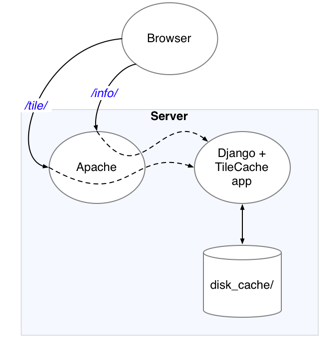
This would all be much easier if you could serve TileCache requests from within your Django application. They're both Python-based; why not?

django_plus_tilecache.png


The TileCache code base includes sample code that shows how to run TileCache as a CGI or a FastCGI service. I couldn't find any sample code for running TileCache within a Django application, but it was easy to convert the cgiHandler code for use with Django's HttpRequest objects.

Installation Prerequisites

In order for TileCache to generate its own tiles, instead of delegating to a separate mapserver instance, you must already have compiled and installed mapserver's Python mapscript bindings. For instructions on compiling the bindings see the mapscript/python/README file in the mapserver source distribution.

Configuring TileCache


import os
thisdir = os.path.abspath(os.path.dirname(__file__))
def relpath(p):
return os.path.abspath(os.path.join(thisdir, p))

from TileCache.Service import Service
import TileCache.Layers.MapServer as MS

# Create the service 'singleton'.
_mapfile = relpath("../mapserv/data/mapfile.map")

_service = Service(
_cache, # See "Cache Invalidation", below
{
"basic": MS.MapServer(
"basic", _mapfile, layers="basic", debug=False),
}
)


Handling Tile Requests

This is the sweet part. It's derived from the cgiHandler() example in the TileCache source code, but Django's HttpRequest class makes the implementation very simple:


def get_tile(request):
global _service

format, image = _service.dispatchRequest(
request.GET, request.path, request.method,
request.get_host())
result = HttpResponse(str(image), mimetype=format)
return result


What About Feature Info Requests?

I don't know much about the required web API of a WMS server, but it appears as if the same URL must serve both tiles and feature info requests; the type of request is determined by the Request querystring parameter.

Django's dispatch system is based on URL pathnames; I'm not aware of any way to dispatch based on query string parameters. So you'll need to either configure your web server (e.g. Apache) to rewrite WMS requests to distinct URLs provided by your Django app, or you'll need to do some dispatch within your Django app.

Suppose you opt for the latter. Then your urls.py might look something like this:

...
url(r'^wms/$', 'world.views.wms', name='wms'),
...

and in world/views.py you might have this:

def wms(request):
if request.GET.get("request") == "GetFeatureInfo":
return get_feature_info(request)
return get_tile(request)

Cache Invalidation

For my web app, several of the tile layers are derived from a Django model which is updated via the admin interface. Whenever the model changes, the tile cache for the corresponding layer(s) needs to be invalidated, so the images can be regenerated.

The TileCache Cache interface doesn't provide for invalidation. Since I'm using a filesystem-based cache, I subclassed TileCache.Caches.Disk to create a Disk cache which does support invalidation.

import shutil
from TileCache.Caches.Disk import Disk

class InvalidatingDisk(Disk):
"""A Disk cache which can invalidate its contents,
layer by layer."""
def invalidate(self, layerName=None):
if self.basedir:
pathname = self.basedir
if layerName is not None:
pathname = os.path.join(self.basedir,
layerName)
shutil.rmtree(pathname, ignore_errors=True)

2009/09/22

Introducing Google Chrome Frame

Introducing Google Chrome Frame:

"With Google Chrome Frame, developers can now take advantage of the latest open web technologies, even in Internet Explorer. From a faster Javascript engine, to support for current web technologies like HTML5's offline capabilities and <canvas>, to modern CSS/Layout handling, Google Chrome Frame enables these features within IE with no additional coding or testing for different browser versions.
To start using Google Chrome Frame, all developers need to do is to add a single tag:


<meta equiv="X-UA-Compatible" content="chrome=1">
"


I guess that's good news. Makes you wonder why the target audience wouldn't just install Google Chrome. But I suppose this lets people continue to use IE while using modern web facilites on sites which require them.

2009/08/17

ActionScript: TileList, deleting, scrolling backwards

I have a Flex app which shows users a TiledList of chemical structure depictions. Since it can be a large list, it's lazy-loaded from the server as the user scrolls through the list.

Users can delete items from the list, with undo. In order to do this with reasonable performance, once the app has received confirmation from the server that an item has been deleted, it clears out the single deleted item from its local lazy-list.

To undo the deletion locally, the Flex app fills the correct lazy-list entry with an ItemPendingError; that error gets thrown as soon as the TileList tries to retrieve the item.

All of this works okay when the row containing the undeleted item is already visible. On the other hand, if the user has scrolled away from the row where the undeleted item will reappear, then when (s)he scrolls back the TileList simply empties out that item and all of the successive items in the row. Ugly!

ugly_repaint.png


Workaround

When the item is undeleted, immediately try to retrieve it via getItemAt(itemIndex). Catch the resulting ItemPendingError and register an ItemResponder. When the ItemResponder's result or fault method is called, tell the TileList to invalidateList(). If the undeleted item actually contains a value, the TileList will repaint correctly -- no more unsightly gaps.


import mx.collections.errors.ItemPendingError;
import mx.collections.ItemResponder;
[...]
try {
structures.getItemAt(offset);
} catch (e:ItemPendingError) {
e.addResponder(
new ItemResponder(
function(result:Object, token:Object = null):void {
tilelist.invalidateList();
},
function(error:Object, token:Object = null):void {
tilelist.invalidateList();
}));
}

2009/04/21

An Introduction to W3C Widgets

An Introduction to W3C Widgets:

"The king of browser compatibility tables, ppk, recently posted an introduction to W3C Widgets:

"


A new web standard to cover Konfabulator, Dashboard et al?

2009/03/05

Web Hooks ≈ callback URLs

WTF is a Web Hook?:

"In short, a web hook, or "http callback" allows you to subscribe to another website's events with a URL. You tell a website, "Hey, when some event happens, send some information about it to this URL". Why? It doesn't matter, it's up to the developer to decide what to do with that information."


(low-lumen) Enlightenment

I begin to see how to apply component-oriented techniques to distributed/federated web application development. Thanks to John Herren (bwo Tim O'Reilly) for the clue.

Stainless for OS X Leopard

Stainless for OS X Leopard:

"A prime example is parallel sessions, which allow you to log into a site using different credentials in separate tabs at the same time. This new technology is woven throughout Stainless, from the private cookie storage system, to session-aware bookmarks that remember the session in which they were saved."


That would be useful for website development, whether testing authentication or propagation of messages/event notifications among users.

Guess I should download and give it a try. So many new tools, so little time...

2009/03/04

FF3.1b2, Safari 4b, and html 5 canvas, continued

The previous post described improved support for the HTML 5 canvas. It turns out the latest betas of both Firefox and Safari also support the canvas toDataURL method.

An obvious use for this method is to let users easily copy and paste rendered depictions into other applications.

    function saveToBitmap() {
var canv = $('#canv');
var img = $('img#bitmap');
img.attr('src', canv[0].toDataURL());
};


toDataURL_result.png

Firefox 3.1b2, Safari 4 Beta and HTML 5 canvas text

This will be useful for depicting chemical structures using HTML5 canvas: both Safari 4 beta and Firefox 3.1b2 support the HTML5 canvas text rendering APIs.

There are still rough edges, e.g. it's hard to measure text dimensions and therefore hard to position text properly. Still, it's great to see!

$(document).ready(function() {
function redraw() {
var canv = $('#canv');
var w = canv.width();
var h = canv.height();
// Let canvas know how big CSS wants it to be.
canv.attr("width", w);
canv.attr("height", h);
var ctx = canv[0].getContext("2d");

ctx.clearRect(0, 0, w, h);

var msg = "Hello, Safari text.";
var fontSpec = "24pt Verdana";

// Find out the dimensions of the rendered msg.
var e = $('<span style="visibility:hidden;font:' + fontSpec + '">' +
msg + '</span>');
$('body').append(e);
var tw = e.width();
var th = e.height();
e.remove();

ctx.save();
ctx.translate(w/2, h/2);
// Indented to highlight transformation state.
ctx.save();
ctx.rotate(-45 * Math.PI / 180.0);
ctx.translate(-tw/2, th/2);
ctx.font = fontSpec;
ctx.fillText(msg, 0, 0);
ctx.restore();
ctx.restore();
};
redraw();
});

2009/02/24

ADC - CSS Recipes for WebKit

Safari 4 Beta has some nice features. Some have apparently been around since Safari 3, but I didn't notice. For example:

ADC — CSS Recipes for WebKit:

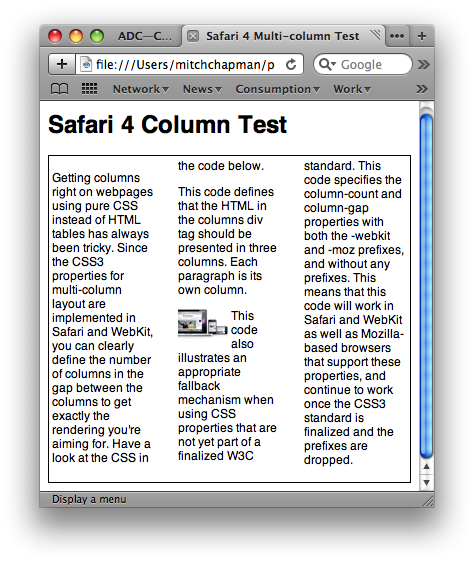
"Getting columns right on webpages using pure CSS instead of HTML tables has always been tricky. Since the CSS3 properties for multi-column layout are implemented in Safari and WebKit, you can clearly define the number of columns [and] the gap between the columns...

This code defines that the HTML in the columns div tag should be presented in three columns. Each paragraph is its own column."


Wow, that's nice! It means you can define a fluid multi-column layout and have content flow between those columns.
safari_4_columns_1.png

Granted, the layout can do some strange things when images bleed across columns.
safari_4_columns_2.png

Maybe one of the -webkit-column-break-* properties can control this.

[Update: Of course Firefox 3 supports most of these column properties as well, via -moz-column-*. Firefox 3.1 beta 2 extends support to properties such as -moz-column-rule.]

2009/02/18

Canvas for a Text Editor?

Canvas for a Text Editor?:

The HTML 5 specification includes an API to render text on a canvas. Unfortunately, this portion of the canvas API has only been implemented by Firefox, though it's already in WebKit nightly builds (and thus will very likely be in a future version of Safari) and Chromium nightlies (from which Chrome versions are derived). We expect Opera will soon as well.


Support for canvas text in browsers other than Firefox will be a great thing for web applications. I've built 2D chemical structure viewers using Canvas, and the clunkiest aspect has been the overlaid text divs for atom labels. (Thank goodness for TextCanvas. Without it, I wouldn't have made the effort.)

You don't really notice text overlays are being used unless you accidentally click-drag your mouse over a depiction, or you set your browser preferences to disallow text smaller than a set size.

2009/02/16

Mozilla Webdev » Blog Archive » Native JSON in Firefox 3.1

Mozilla Webdev » Blog Archive » Native JSON in Firefox 3.1:

"Pretty easy huh? And here’s how to get a JSON string from an object:

var personString = JSON.stringify(person);"


As a long-time fan of Python's pickle and shelve, I hope JSON.stringify properly handles JavaScript object graphs. And I hope jQuery exposes a similar API.

I think jQuery provides only .param, which is designed as a helper for forms serialization and which does not handle nested objects. For example, in jQuery 1.3.1 this:

var graph = {
'item': {
'name': 'bob',
value:42
},
'index': 1};
$('#msg').html("Graph: " + $.param(graph));


produces this:
Graph: item=%5Bobject+Object%5D&index=1

2009/01/20

Django snippets: DebugFooter middleware with textmate links

Django snippets: DebugFooter middleware with textmate links:

"This version adds TextMate links : if you are working on your local machine and using TextMate you can click on the template paths and they will be opened in TextMate. This speeds up development time considerably!
also, this works with django 1.0"


Very useful.

2009/01/14

jQuery 1.3 Live Events

Release:jQuery 1.3 - jQuery JavaScript Library:

"Live Events

jQuery now supports 'live events' - events that can be bound to all current - and future - elements. Using event delegation, and a seamless jQuery-style API, the result is both easy to use and very fast."


If I read this correctly, now you can reload parts of your page and have any replaced controls wired up automatically. No more need for post-processing callbacks on $.load() or $.getJSON()?

Outstanding!

(And the description, "Live Events", is concise — much better than the term "path-based bindings" that I've been using.)

2008/11/18

Can't debug after updating to Flex Builder 3.0.2

I'm evaluating FlexBuilder 3, and have just installed the Flex Builder 3.0.2 update. All of a sudden I can't debug my AIR project.

The error dialog displays a lengthy message which ends with:

error while loading initial content


Thanks to Google and Adobe's public bug database, the fix is straightforward: edit the project's *-app.xml file and change the namespace (2nd line) to 1.5:


<application xmlns="http://ns.adobe.com/air/application/1.5">

2008/11/05

One-line web server in Python

From Ed Taekema's weblog, a reminder[1] about how to create a web server in one line of Python:

python -c 'import SimpleHTTPServer;SimpleHTTPServer.test()'


This starts a server listening on port 8000, serving files from its launch directory. If you just hit the server (http://localhost:8000/) it will by default serve index.html; if index.html doesn't exist, it will give you a directory listing. Also, the server will provide only those files residing in or below the current working directory; e.g. http://localhost:8000/../ resolves to the default document.

Wish I'd seen Ed's note this morning...

This is handy when you want to experiment with things like interactions between Flex applications and JavaScript, or other situations in which you can't get by with simple file:/// URLs. This would be handy as a jqUnit test, as well.


[1] Reminder? It's been a long time since I read "Internet Programming with Python" :-)

2008/08/02

New TextMate bundles

These aren't really new. I just wasn't aware of them.

JavaScript Tools


The JavaScript Tools bundle helps you lint, format and compress your JavaScript code, and convert code to and from JavaScript bookmarklets.

My favorite feature: whenever you save a JavaScript file via Command-S, the bundle automatically runs it through jslint. If any errors or warnings are found, a tooltip appears which shows the number of warnings/errors.

If you run a full validation using Control-Shift-V, you'll get a popup window showing "compilation" results -- complete with syntax errors and clickable links to take you to the offending source code.

Installation


I installed under ~/Library/Application Support/. It may be better to use /Library/Application Support/.
$ cd ~/Library/Application Support/TextMate/Bundles
$ svn export http://bundles.bundleforge.com/trunk/bundles/JavaScript%20Tools.tmbundle/

BTW I'm not sure why export is preferred over checkout.

If TextMate is already running, you can load the bundle by selecting Bundles->Bundle Editor->Reload Bundles.

Sproutcore


I haven't done much with Sproutcore yet, but it does already have its own TextMate bundle which provides a few tab-completion snippets.

Installation

$ cd ~/Library/Application Support/TextMate/Bundles
$ curl --location --get http://github.com/sproutit/sproutcore-tmbundle/tarball/master -o sproutcore-tmbundle.tar
$ tar xf sproutcore-tmbundle.tar


The curl --location option is required, since github will issue a redirect.

The extracted tarfile will have a root directory name of the form sproutit-sproutcore-tmbundle-.*, so a directory rename is needed.
$ mv sproutit-sproutcore-tmbundle-blah-blah.../ Sproutcore.tmbundle