2018/11/20
2010/02/22
Mercurial, Migration Assistant, and dotfiles
I recently upgraded my iMac. Migration Assistant moved all of my files to the new machine without issue -- or so it seemed.
I had created Mercurial repositories in a couple of virtualenv environments, to track changes locally.[1] I didn't notice that Mercurial had put each virtual environment's .Python file under revision control.
Shortly after completing the migration I made changes in one of these virtual environments. A quick 'hg status' before committing, and...
$ hg status
abort: data/.Python.i@13b27e856c38: no match found!
WTF?
After much investigation it appears that the following has happened.
- Mercurial represented the .Python link in its .hg/store/data directory as ._Python.i
- The leading underscore appears to be Mercurial's way of noting that the 'P' should be capitalized.
- I think Migration Assistant uses ditto to copy files.
- ditto saw the leading '._' and concluded this was an orphaned resource file.[2] So it didn't copy the file.
- Mercurial knew that it was supposed to have a .hg/store/data/._Python.i file; when it couldn't find it, it decided the repository was corrupted.
Luckily the problem cropped up before I traded in the old machine, so I was able to copy across the missing files manually.
In my experiments, the problem manifested only when the capitalized dotfile was a symbolic link, not when it was a regular data file.
Well... the above write-up contains several unproven assertions, e.g. about the conditions under which Mercurial will create a '._' filename. I'm not really sure whether this is a bug or merely a caveat regarding an obscure corner condition. For now, the easiest workaround is:
Don't Track virtualenv .Python Files With Mercurial.
[Update 2010/02/22: Someone has already filed this as a Mercurial bug.]
[1] (Mercurial makes a great filesystem "undo" facility, useful even for directory trees which you never intend to share with anyone else.)
[2] OS X still supports something ike resource forks. In tarballs and other non-OS Extended filesystems, resource forks are represented as dot-files with a leading underscore. (See Norman Walsh's blog for more info.) For example, the resource fork for a file named 'foo.txt' might be '._foo.txt'.
2009/09/24
Running TileCache within a Django Application
Punchline
Here is how to serve TileCache tile images from within a Django application.
from TileCache.Service import Service
_service = Service(...)
def get_tile(request):
global _service
format, image = _service.dispatchRequest(
request.GET, request.path, request.method,
request.get_host())
result = HttpResponse(str(image), mimetype=format)
return result
Scenario
You're building a low-traffic Django-based GIS application, and you need to serve your own map layers. You're using TileCache to improve your application's performance. But installation and configuration are hassles.
- All of your servers must run with the right user and group IDs, so the Django app can expire the tile cache when necessary.
- Your Django app needs to understand the structure of the tile cache, so it can remove the correct tile images when the underlying data changes.
- Etc.
This would all be much easier if you could serve TileCache requests from within your Django application. They're both Python-based; why not?
The TileCache code base includes sample code that shows how to run TileCache as a CGI or a FastCGI service. I couldn't find any sample code for running TileCache within a Django application, but it was easy to convert the cgiHandler code for use with Django's HttpRequest objects.
Installation Prerequisites
In order for TileCache to generate its own tiles, instead of delegating to a separate mapserver instance, you must already have compiled and installed mapserver's Python mapscript bindings. For instructions on compiling the bindings see the
mapscript/python/README file in the mapserver source distribution.Configuring TileCache
import os
thisdir = os.path.abspath(os.path.dirname(__file__))
def relpath(p):
return os.path.abspath(os.path.join(thisdir, p))
from TileCache.Service import Service
import TileCache.Layers.MapServer as MS
# Create the service 'singleton'.
_mapfile = relpath("../mapserv/data/mapfile.map")
_service = Service(
_cache, # See "Cache Invalidation", below
{
"basic": MS.MapServer(
"basic", _mapfile, layers="basic", debug=False),
}
)
Handling Tile Requests
This is the sweet part. It's derived from the cgiHandler() example in the TileCache source code, but Django's HttpRequest class makes the implementation very simple:
def get_tile(request):
global _service
format, image = _service.dispatchRequest(
request.GET, request.path, request.method,
request.get_host())
result = HttpResponse(str(image), mimetype=format)
return result
What About Feature Info Requests?
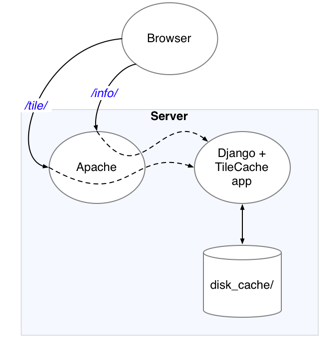
I don't know much about the required web API of a WMS server, but it appears as if the same URL must serve both tiles and feature info requests; the type of request is determined by the Request querystring parameter.
Django's dispatch system is based on URL pathnames; I'm not aware of any way to dispatch based on query string parameters. So you'll need to either configure your web server (e.g. Apache) to rewrite WMS requests to distinct URLs provided by your Django app, or you'll need to do some dispatch within your Django app.
Suppose you opt for the latter. Then your urls.py might look something like this:
...
url(r'^wms/$', 'world.views.wms', name='wms'),
...
and in world/views.py you might have this:
def wms(request):
if request.GET.get("request") == "GetFeatureInfo":
return get_feature_info(request)
return get_tile(request)
Cache Invalidation
For my web app, several of the tile layers are derived from a Django model which is updated via the admin interface. Whenever the model changes, the tile cache for the corresponding layer(s) needs to be invalidated, so the images can be regenerated.
The TileCache Cache interface doesn't provide for invalidation. Since I'm using a filesystem-based cache, I subclassed TileCache.Caches.Disk to create a Disk cache which does support invalidation.
import shutil
from TileCache.Caches.Disk import Disk
class InvalidatingDisk(Disk):
"""A Disk cache which can invalidate its contents,
layer by layer."""
def invalidate(self, layerName=None):
if self.basedir:
pathname = self.basedir
if layerName is not None:
pathname = os.path.join(self.basedir,
layerName)
shutil.rmtree(pathname, ignore_errors=True)
at
12:15
0
comments
Labels: python, software development, web development
2009/04/24
Developing Django apps with zc.buildout
Found this excellent introduction via Looking for quotes about Buildout.
Developing Django apps with zc.buildout:
"...
Finally, Buildout generated a bin/python interpreter."
So buildout makes it easy to create isolated Python environments, just like virtualenv, but perhaps with a different goal: isolated development environments vs. isolated deployment environments? Not sure; gotta read more...
at
06:44
0
comments
Labels: django, python, software development
2009/04/17
Lang.NET 2009 at Ted Leung on the Air
Gratis ago ad Ted Leung for posting his summary of Lang.NET 2009. It seems like every time I see one of his summaries, my reading and projects lists grow.
Newspeak and Hopscotch
More reading here. Ted also links indirectly to the video of Gilad Bracha's talk.
Powershell
[Jeffrey Snover] seemed to think that UNIX shells could gain a fair amount of PowerShell’s capabilities by recognizing that pipes ship bytestreams, adopting a data format (like JSON or XML) for those byte streams, and proceeding from there. That might be true technically, but that would be a huge cultural change for that community.
Hm... imagine a
/usr/bin_json/ sitting alongside /usr/bin. The first prototypes of the utilities therein could be based on David Beazley's tutorial "A Curious Course on Coroutines and Concurrency". (Start at slide 34 of the presentation slides.)Monads
[Erik Meijer] then used mindless symbol pushing to demonstrate that [IEnumerable and IObservable] were duals of each other, and that they obeyed the rules for monads.
I'm so far behind on terminology... what the heck is a monad? Google suggests it's what Pythonistas would call a list comprehension or a generator expression.
Favorite Quote
I suspect that this is the only conference I will go to all year where Macs are the minority.
at
05:38
0
comments
Labels: python, software development
2009/01/20
Django snippets: DebugFooter middleware with textmate links
Django snippets: DebugFooter middleware with textmate links:
"This version adds TextMate links : if you are working on your local machine and using TextMate you can click on the template paths and they will be opened in TextMate. This speeds up development time considerably!
also, this works with django 1.0"
Very useful.
at
11:11
0
comments
Labels: python, software development, textmate, web development
2008/11/05
One-line web server in Python
From Ed Taekema's weblog, a reminder[1] about how to create a web server in one line of Python:
python -c 'import SimpleHTTPServer;SimpleHTTPServer.test()'
This starts a server listening on port 8000, serving files from its launch directory. If you just hit the server (
http://localhost:8000/) it will by default serve index.html; if index.html doesn't exist, it will give you a directory listing. Also, the server will provide only those files residing in or below the current working directory; e.g. http://localhost:8000/../ resolves to the default document.Wish I'd seen Ed's note this morning...
This is handy when you want to experiment with things like interactions between Flex applications and JavaScript, or other situations in which you can't get by with simple
file:/// URLs. This would be handy as a jqUnit test, as well.[1] Reminder? It's been a long time since I read "Internet Programming with Python" :-)
at
17:04
0
comments
Labels: python, web development
2008/11/01
Removing old man pages from OS X Leopard
Back in January I posted about Leopard, 'ls -l' and extended attributes. The gist was that my man pages were out of date, so they didn't explain what the @ character represented, in 'ls -l' output.
Some threads on the Apple discussion boards have investigated why the man pages don't get updated. The conclusion is that Leopard installs a lot of gzip-compressed man pages without deleting the corresponding uncompressed man pages. (It may be that this is true only for upgrade installs.) A recommended workaround was to scan through the man page directories with a shell command, re-locating all uncompressed man pages which had corresponding compressed man pages.
I decided to be cowardly in doing this. Here's a Python script which moves each uncompressed man page only if it is older than its corresponding gzipped man page.
The script must be run with superuser privileges, e.g. sudo python mv_old_man_pages.py
It processes all of the man pages under /usr/share/man, moving old, uncompressed man page files to ~/tmp/old_man_pages.
I would post this to the Apple discussion forums, but it's really overkill. The short shell scripts already posted should work fine, if you ignore the harmless error messages and process each man/man* directory manually.
#!/usr/bin/env python
# encoding: utf-8
"Remove obsolete uncompressed man pages on an OS X Leopard system."
import sys, os, logging
def candidateOldManPages():
os.chdir("/usr/share/man")
for dirpath, dirnames, filenames in os.walk("."):
for f in filenames:
if f.endswith(".gz"):
fOld = f[:-3]
if fOld in filenames:
yield os.path.join(dirpath, f), os.path.join(dirpath, fOld)
def findOldManPages():
for p, pOld in candidateOldManPages():
s = os.stat(p)
try:
sOld = os.stat(pOld)
except os.error, info:
# Some man pages may be broken symbolic links
logging.warn("Can't stat (%s, %s): %s" % (p, pOld, info))
if os.path.islink(pOld):
yield pOld
else:
if s.st_mtime > sOld.st_mtime:
yield pOld
def mvOldManPages():
topDestDir = os.path.expanduser("~/tmp/old_man_pages")
for relpath in findOldManPages():
dirname = os.path.dirname(relpath)
filename = os.path.basename(relpath)
destDir = os.path.join(topDestDir, dirname)
if not os.path.exists(destDir):
os.makedirs(destDir)
logging.debug("mv %s %s" % (relpath, os.path.join(destDir, filename)))
os.rename(relpath, os.path.join(destDir, filename))
def main():
"""Mainline for standalone execution"""
logging.basicConfig(level=logging.DEBUG,
format="%(levelname)s: %(message)s")
mvOldManPages()
if __name__ == "__main__":
main()
at
08:02
0
comments
2008/04/08
Thank you, wsgi
Thanks to all of the developers behind wsgi.
When I first heard about it, wsgi struck me as an unnecessary complication. Then someone showed me how it could simplify testing of web applications. And now:
High-Scalability:
Google App Engine supports any framework written in pure Python that speaks CGI (and any WSGI-compliant framework using a CGI adaptor), including Django, CherryPy, Pylons, and web.py. You can bundle a framework of your choosing with your application code by copying its code into your application directory.
at
06:35
0
comments
Labels: python, software development, web development
2008/03/21
Functest
"This is where functest really shines. When you run functest against any directory or file the collector actually compiles a dependency chain which includes any valid python modules in all the parent directories..."
Hm. So functest would let me dispense with this nonsense boilerplate in my test modules?
import os
thisdir = os.path.abspath(os.path.dirname(__file__))
def relpath(p):
return os.path.abspath(os.path.join(thisdir, p))
sys.path.insert(relpath("../"))
I wonder if nose does/will provide similar facilities? It's pretty nice in other respects...
at
11:17
0
comments
Labels: python, software development, testing
Twill, CherryPy 3 and testing with internal servers
Twill can test CherryPy web servers "in process", without having to run them as servers. I've used twill this way with CherryPy 2, but when I recently tried to do the same thing with a CherryPy 3 server everything broke.
I had based my code on an old CherryPy 2 tutorial by Titus Brown, and was trying to grep through the CherryPy 3 code tree to figure out how to patch it up. Bad idea :)
Yesterday Google finally turned up a solution, from a talk Titus gave at PyCon 2007.
The upshot: don't use cherrypy._cpwsgi.CPWSGIApp. In CherryPy 3, your application itself is already a WSGIApp. What's more, I think cherrypy._cpwsgi.CPWSGIApp may be broken. For sure, it and twill have incompatible ideas about the correct type of the 2nd constructor argument.
Anyway, thanks to Titus, here's an example of how to connect twill to a CherryPy 3 application for in-process testing:
import cherrypy
...
wsgi_app = cherrypy.tree.mount(myApp, "/", myConfig)
cherrypy.engine.start(blocking=False)
twill.add_wsgi_intercept('localhost', 8080, lambda: wsgi_app)
[Update 2008/03/24] Ditched the
cherrypy.server.quickstart() invocation, per fumanchu's comment. Reported as Ticket #801.
at
09:47
2
comments
Labels: python, software development, web development
2008/03/03
Intermittent Pickle Problems in Jython
The previous post mentioned "integrating" Jython and CPython by transmitting a stream of pickles between the two. I encountered one intermittent problem with this approach, and I'm unsure of its cause. (Hm, and I should probably post this to a Jython mailing list...)
Problem
In Jython I'd pickled the str() of a java.io.StringWriter, into which I'd just written the SD representation of a CDK molecule. Jython could create the pickle alright. But when I tried to unpickle it in CPython, sometimes, for some molecules, I got a traceback:
File "/Library/Frameworks/Python.framework/Versions/2.5/lib/python2.5/pickle.py", line 970, in load_string
raise ValueError, "insecure string pickle"
ValueError: insecure string pickle
The error occurred consistently in my application code, always on the same input structure. But I couldn't derive a simple test script to demonstrate the problem.
Investigation
Examination of the problematic pickle data showed that a Python unicode string literal marker had somehow been inserted, and the type code for the item was somehow
S (for string) rather than V (for unicode):...
sS'sdf'
p3
Su'ZINC00000181\n CDK...
^ What the... ?
Workaround
Google turned up a usable workaround: encode the offending string as utf-8 before trying to pickle it.
import codecs
enc = codecs.getencoder('utf8')
...
sdf = enc(sdf)
...
at
12:10
0
comments
Labels: java, python, software development
Ted Leung: The Sun is going to shine on Python
Congratulations to Ted Leung (and to Frank Wierzbicki):
The Sun is going to shine on Python.
Their work at Sun will extend well beyond Jython, but Ted's post reminded me of my recent experiences. Jython 2.2 sure made it pleasant and easy[1] to get what I needed out of CDK, and to integrate the results into a CPython app via pickle and subprocess.
I did miss some language features such as yield which have appeared in CPython since 2.2. Maybe at some point Ted and/or Frank will have time to re-sync Jython with CPython?
[1] I had one intermittent problem with this approach. See the next post.
at
11:54
0
comments
Labels: java, python, software development
2008/01/03
Replacing cron with iCal
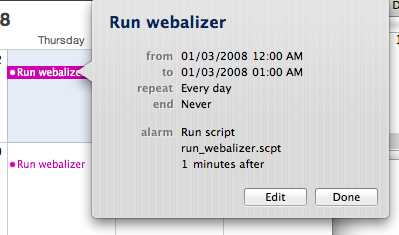
cron is deprecated in OS X. iCal makes a straightforward, if tedious, replacement, despite its limited support for scripted alarms.
In iCal you can easily create a repeating event with an associated alarm that runs a script.

Put all of your periodic system management events into a hidden "Automation" calendar (so they don't clutter up the calendar view) and you're all set.

Of course, there's a problem. I prefer to write system management scripts using Python. iCal can run only AppleScripts.
It's easy to write an AppleScript "wrapper" which just launches a shell script, but the process involves lots of button-clicking:
- Launch Script Editor
- Enter
do shell script "/path/to/shell/script" - Save the script
- Quit Script Editor
Given the path to a shell script, the following Python program creates a corresponding AppleScript wrapper in the same directory:
import sys, os, subprocess, logging
def main():
for filename in sys.argv[1:]:
pathname = os.path.abspath(filename)
scriptname = os.path.splitext(pathname)[0] + ".scpt"
if os.path.exists(scriptname):
os.remove(scriptname)
status = subprocess.call([
"osacompile",
"-e", 'do shell script "%s"' % pathname,
"-o", scriptname])
if status:
logging.error("Got status %d creating %s" %
(status, scriptname))
if __name__ == "__main__":
main()
at
11:08
3
comments
Labels: os x, python, software development
2007/12/12
CDK, Jython and chemical structure format conversion
These days I'm learning how to work with some new (to me) Java cheminformatics toolkits. Google, Jython 2.2.1, and VoodooPad are helping me get up to speed:
- Google to find the documentation for the Java APIs
- Jython to learn API nuances without an edit/compile/test cycle
- VoodooPad as a scratchpad for sample scripts -- it's easy to save them in pages that sit alongside my worklog
During initial exploration I just bang up the script in VoodooPad, then repeatedly select all (Cmd-A), copy (Cmd-C), switch to a Terminal session running Jython (Cmd-Tab), and paste (Cmd-V).
The "learnings" are going into proper Jython scripts maintained with TextMate.
It's nice to be able to deploy using Jython instead of pure Java. Since almost all of the heavy lifting is being done inside the cheminformatics jars, I don't need to worry about the overhead of running a Python interpreter inside a JVM...
Here's a simple example using CDK, to transform an SD string into a SMILES string.
# You must have set your CLASSPATH to pick up the CDK jar.
# encoding: utf-8
import java.io
from org.openscience import cdk
def getCDKMol(sdf):
reader = cdk.io.MDLReader(java.io.StringReader(sdf))
result = cdk.Molecule()
result = reader.read(result)
return result
def getSmiles(cdkMol):
result = java.io.StringWriter()
writer = cdk.io.SMILESWriter(result)
writer.write(cdkMol)
return str(result)
def sdfToSmiles(sdf):
return getSmiles(getCDKMol(sdf))
# Example:
print sdfToSmiles("""1-7
42 44 0 0 0 0 999 V2000
-0.8349 0.9908 0.0000 N 0 0 0 0 0 0 0 0 0 0 0 0
-0.0502 1.2457 0.0000 C 0 0 0 0 0 0 0 0 0 0 0 0
-0.0502 2.0707 0.0000 C 0 0 0 0 0 0 0 0 0 0 0 0
-0.8349 2.3257 0.0000 C 0 0 0 0 0 0 0 0 0 0 0 0
-1.3198 1.6582 0.0000 C 0 0 0 0 0 0 0 0 0 0 0 0
0.6172 0.7608 0.0000 C 0 0 0 0 0 0 0 0 0 0 0 0
-1.0898 0.2062 0.0000 C 0 0 0 0 0 0 0 0 0 0 0 0
0.5310 -0.0597 0.0000 C 0 0 0 0 0 0 0 0 0 0 0 0
1.1984 -0.5446 0.0000 C 0 0 0 0 0 0 0 0 0 0 0 0
1.9521 -0.2090 0.0000 C 0 0 0 0 0 0 0 0 0 0 0 0
2.0383 0.6114 0.0000 C 0 0 0 0 0 0 0 0 0 0 0 0
1.3709 1.0964 0.0000 C 0 0 0 0 0 0 0 0 0 0 0 0
-1.8968 0.0346 0.0000 C 0 0 0 0 0 0 0 0 0 0 0 0
-2.1517 -0.7500 0.0000 C 0 0 0 0 0 0 0 0 0 0 0 0
-1.5997 -1.3631 0.0000 C 0 0 0 0 0 0 0 0 0 0 0 0
-0.7927 -1.1915 0.0000 C 0 0 0 0 0 0 0 0 0 0 0 0
-0.5378 -0.4069 0.0000 C 0 0 0 0 0 0 0 0 0 0 0 0
-2.1448 1.6582 0.0000 C 0 0 0 0 0 0 0 0 0 0 0 0
2.6195 -0.6940 0.0000 S 0 0 0 0 0 0 0 0 0 0 0 0
3.1044 -0.0265 0.0000 O 0 0 0 0 0 0 0 0 0 0 0 0
2.1346 -1.3614 0.0000 O 0 0 0 0 0 0 0 0 0 0 0 0
3.2869 -1.1789 0.0000 C 0 0 0 0 0 0 0 0 0 0 0 0
-1.8546 -2.1477 0.0000 C 0 0 0 0 0 0 0 0 0 0 0 0
0.6172 2.5557 0.0000 H 0 0 0 0 0 0 0 0 0 0 0 0
-1.0898 3.1103 0.0000 H 0 0 0 0 0 0 0 0 0 0 0 0
-0.2227 -0.3952 0.0000 H 0 0 0 0 0 0 0 0 0 0 0 0
1.1122 -1.3651 0.0000 H 0 0 0 0 0 0 0 0 0 0 0 0
2.7920 0.9470 0.0000 H 0 0 0 0 0 0 0 0 0 0 0 0
1.4571 1.9168 0.0000 H 0 0 0 0 0 0 0 0 0 0 0 0
-2.4488 0.6477 0.0000 H 0 0 0 0 0 0 0 0 0 0 0 0
-2.9587 -0.9215 0.0000 H 0 0 0 0 0 0 0 0 0 0 0 0
-0.2407 -1.8046 0.0000 H 0 0 0 0 0 0 0 0 0 0 0 0
-0.1632 -1.1420 0.0000 H 0 0 0 0 0 0 0 0 0 0 0 0
-2.1448 0.8332 0.0000 H 0 0 0 0 0 0 0 0 0 0 0 0
-2.1448 2.4832 0.0000 H 0 0 0 0 0 0 0 0 0 0 0 0
-2.9698 1.6582 0.0000 H 0 0 0 0 0 0 0 0 0 0 0 0
3.7719 -0.5114 0.0000 H 0 0 0 0 0 0 0 0 0 0 0 0
2.8020 -1.8463 0.0000 H 0 0 0 0 0 0 0 0 0 0 0 0
3.9544 -1.6638 0.0000 H 0 0 0 0 0 0 0 0 0 0 0 0
-1.0700 -2.4026 0.0000 H 0 0 0 0 0 0 0 0 0 0 0 0
-2.6392 -1.8928 0.0000 H 0 0 0 0 0 0 0 0 0 0 0 0
-2.1096 -2.9323 0.0000 H 0 0 0 0 0 0 0 0 0 0 0 0
1 2 1 0 0 0 0
1 5 1 0 0 0 0
1 7 1 0 0 0 0
2 3 2 0 0 0 0
2 6 1 0 0 0 0
3 4 1 0 0 0 0
3 24 1 0 0 0 0
4 5 2 0 0 0 0
4 25 1 0 0 0 0
5 18 1 0 0 0 0
6 8 2 0 0 0 0
6 12 1 0 0 0 0
7 13 2 0 0 0 0
7 17 1 0 0 0 0
8 9 1 0 0 0 0
8 26 1 0 0 0 0
9 10 2 0 0 0 0
9 27 1 0 0 0 0
10 11 1 0 0 0 0
10 19 1 0 0 0 0
11 12 2 0 0 0 0
11 28 1 0 0 0 0
12 29 1 0 0 0 0
13 14 1 0 0 0 0
13 30 1 0 0 0 0
14 15 2 0 0 0 0
14 31 1 0 0 0 0
15 16 1 0 0 0 0
15 23 1 0 0 0 0
16 17 2 0 0 0 0
16 32 1 0 0 0 0
17 33 1 0 0 0 0
18 34 1 0 0 0 0
18 35 1 0 0 0 0
18 36 1 0 0 0 0
19 20 2 0 0 0 0
19 21 2 0 0 0 0
19 22 1 0 0 0 0
22 37 1 0 0 0 0
22 38 1 0 0 0 0
22 39 1 0 0 0 0
23 40 1 0 0 0 0
23 41 1 0 0 0 0
23 42 1 0 0 0 0
M END
$$$$
""")
at
13:29
0
comments
Labels: cheminformatics, java, os x, python, science, software development, textmate
2007/12/05
SQLElixir/SQLAlchemy/SQLite3 and ISO-8859 content
See here for the full discussion. The upshot is that, if you are storing string data into an SQLite3 database via Python, and if you suspect that the data may contain non-ASCII characters, you need to ensure that it's properly converted to (Python) Unicode before inserting.
# encoding: utf-8
"""Explores a problem importing a chemical structure file into an
SQLElixir/SQLAlchemy/SQLite3 database.
The file was in SD format. One of the tags contained ISO-8859 characters.
Python read the file contents without trouble; SQLite3 stored the contents.
But on retrieval SQLite3 raised an OperationalError:
Could not decode to UTF-8 column '[...]' with text '[...]'
This script explores the problem, and demonstrates two successful
Unicode encodings: utf-8/replaced and utf-8/ignored.
NB: Only the latter actually worked with SQLElixir:
s = unicode(s, encoding='utf-8', errors='ignore')
"""
import unittest, sqlite3
class TestCase(unittest.TestCase):
def setUp(self):
self.conn = sqlite3.connect(":memory:")
self.conn.cursor().execute('CREATE TABLE demo (value TEXT)')
def insertAndDump(self, encoding, errors, expectFailure=False):
caseName = repr([encoding, errors])
data = 'K\xf6 1366'
try:
if encoding is not None:
data = unicode(data, encoding=encoding, errors=errors)
cursor = self.conn.cursor()
cursor.execute("INSERT INTO demo (value) VALUES (?)", [data])
cursor.execute('SELECT * FROM demo')
self.failUnless(len(cursor.fetchall()) == 1)
self.failIf(expectFailure, "Unexpected success for %s" % caseName)
except Exception, info:
self.failUnless(expectFailure, "Failed %s: %s" % (caseName, info))
def testCannotRetrieveUnencoded(self):
self.insertAndDump(None, None, True)
def testCannotEncodeStrict(self):
self.insertAndDump("utf-8", "strict", True)
def testCanRetrieve8859Strict(self):
self.insertAndDump("8859", "strict")
def testCanRetrieveUTF8Ignored(self):
self.insertAndDump("utf-8", "ignore")
def testCanRetrieveUTF8Replaced(self):
self.insertAndDump("utf-8", "replace")
unittest.main()
at
12:54
0
comments
Labels: python, software development, sqlite3