Showing posts with label mac. Show all posts

2018/04/15

Installing Ubuntu 17.10 on a 2013 13" MacBook Air: Wifi

Today I am remembering why I decided to give Mac OS X a try back in 2002: I got tired of spending most of my time configuring linux drivers. I thought the situation might have improved in the interim, and it probably has. Unfortunately, the universe of extant hardware is huge, and it's hard to fill all of the holes. Anyway, today I'm trying to replace macOS with Ubuntu 17.10 on my 2013 13" MacBook Air. Most of the installation has gone smoothly, with the main exception being Wifi. After more than an hour of flailing I found this, and it appears to have worked:

BCM43142 WiFi driver in Ubuntu. | How to install BCM43142 WiFi Driver in Linux

I had to copy a lot of packages from the Ubuntu installer thumb drive, not just the two mentioned in the article. The reason was that the Ubuntu installer didn't install gcc 7 or its supporting packages. Here are the packages that I needed to copy from the installer thumb drive. All files were located under .../pool/main:
  • bcmwl-kernel-source_6.30.223.271+bdcom-0ubuntu3_amd64.deb
  • dkms_2.3-3ubuntu3_all.deb
  • gcc_7.2.0-1ubuntu1_amd64.deb
  • gcc-7_7.2.0-8ubuntu3_amd64.deb
  • libasan4_7.2.0-8ubuntu3_amd64.deb
  • libatomic1_7.2.0-8ubuntu3_amd64.deb
  • libc6-dev_2.26-0ubuntu2_amd64.deb
  • libc-dev-bin_2.26-0ubuntu2_amd64.deb
  • libcilkrts5_7.2.0-8ubuntu3_amd64.deb
  • libgcc-7-dev_7.2.0-8ubuntu3_amd64.deb
  • libitm1_7.2.0-8ubuntu3_amd64.deb
  • liblsan0_7.2.0-8ubuntu3_amd64.deb
  • libmpx2_7.2.0-8ubuntu3_amd64.deb
  • libquadmath0_7.2.0-8ubuntu3_amd64.deb
  • libtsan0_7.2.0-8ubuntu3_amd64.deb
  • libubsan0_7.2.0-8ubuntu3_amd64.deb
  • linux-libc-dev_4.13.0-16.19_amd64.deb
  • make_4.1-9.1_amd64.deb

2011/03/09

Squeeze play?

The Mac App Store (MAS) requires participating developers to pay Apple $99/year plus 30% of gross sales price; only apps which are approved by Apple may be sold via MAS.

Xcode4 was released today on MAS, for $4.99. It used to be included on the OS X distribution DVDs, as a no-extra-cost optional installation.

The beta distributions of OS X Lion is available only through the MAS. As far as I know it does not include Xcode.

Developers are not forced to sell their applications through the MAS. In fact, some types of software, those which require administrator privileges for installation, must be sold outside the MAS.

Still, Apple seems to be edging down a path at the terminus of which developers must pay an annual fee to sell software for use on OS X, and must have that software approved by Apple before it can be offered for sale.

I sincerely hope this isn't what they have in mind.

Thank goodness for Linux.

2010/08/13

iHelp for Autism - - News - San Francisco - SF Weekly

iHelp for Autism - - News - San Francisco - SF Weekly:

"After he began spending 30 minutes at a time on apps designed to teach spelling, counting, drawing, making puzzles, remembering pictures, and more, she sat down at her own computer."


Maybe it is a magical device.

2010/05/25

Growl - The iPad and immersive computing - O'Reilly Radar

This made me chuckle.

The iPad and immersive computing - O'Reilly Radar:

"I love how focused I am using an iPad, versus working on a laptop. New mail isn't constantly arriving; tweets aren't Growling into view; I don't even have an RSS reader installed."


When Growl first appeared I couldn't imagine why a sane Mac user would want it. How could you make fun of Windows and its incessant, work-stopping notification balloons, and want the same sort of behavior on your Mac? Better to see an alert when something goes wrong than to be interrupted by a balloon whenever something works as expected.

Of course, I long ago installed Growl on my desktop :)

It's not (necessarily) as intrusive as the old Windows notification balloons: you can control which apps generate Growl notifications. As with eye-grating page layouts in early desktop-publishing, or blinking text in early web pages, there's always the danger that you'll turn on all notifications because you can.

I do like the ease with which you can create custom Growl notifications for your own scripts/applications. T.ex. when I create a new timestamp in my VoodooPad worklog, Growl pops up a summary of times by task for the day. Were I not so lazy, I could ask it to notify me when long-running distributed compute jobs have finished; etc.

Anyway, it was funny to read the observations on O'Reilly Radar, written almost as though Growl were part of a standard OS X install.

2010/04/28

You have mail?

Recently, when opening new Terminal sessions in Mac OS X, I've started seeing a familiar old message before the first shell prompt.

Last login: Wed Apr 28 06:27:11 on ttys006
You have mail.
mymac:~ my_username$


I assumed some system utility had delivered a notification via /usr/bin/mail. What did the message say?
$ mail
mail: /var/mail/my_username: Is a directory


Indeed, /bin/ls showed an empty my_username directory in /var/mail.

Weird.

In any case I deleted /var/mail/my_username/, and the notifications no longer appear in new Terminal sessions.

2010/02/22

Mercurial, Migration Assistant, and dotfiles

I recently upgraded my iMac. Migration Assistant moved all of my files to the new machine without issue -- or so it seemed.

I had created Mercurial repositories in a couple of virtualenv environments, to track changes locally.[1] I didn't notice that Mercurial had put each virtual environment's .Python file under revision control.

Shortly after completing the migration I made changes in one of these virtual environments. A quick 'hg status' before committing, and...


$ hg status
abort: data/.Python.i@13b27e856c38: no match found!


WTF?

After much investigation it appears that the following has happened.

  1. Mercurial represented the .Python link in its .hg/store/data directory as ._Python.i
    1. The leading underscore appears to be Mercurial's way of noting that the 'P' should be capitalized.

  2. I think Migration Assistant uses ditto to copy files.
    1. ditto saw the leading '._' and concluded this was an orphaned resource file.[2] So it didn't copy the file.

  3. Mercurial knew that it was supposed to have a .hg/store/data/._Python.i file; when it couldn't find it, it decided the repository was corrupted.


Luckily the problem cropped up before I traded in the old machine, so I was able to copy across the missing files manually.

In my experiments, the problem manifested only when the capitalized dotfile was a symbolic link, not when it was a regular data file.

Well... the above write-up contains several unproven assertions, e.g. about the conditions under which Mercurial will create a '._' filename. I'm not really sure whether this is a bug or merely a caveat regarding an obscure corner condition. For now, the easiest workaround is:

Don't Track virtualenv .Python Files With Mercurial.

[Update 2010/02/22: Someone has already filed this as a Mercurial bug.]


[1] (Mercurial makes a great filesystem "undo" facility, useful even for directory trees which you never intend to share with anyone else.)

[2] OS X still supports something ike resource forks. In tarballs and other non-OS Extended filesystems, resource forks are represented as dot-files with a leading underscore. (See Norman Walsh's blog for more info.) For example, the resource fork for a file named 'foo.txt' might be '._foo.txt'.

2009/07/21

Unresponsive console.app on OS X 10.5

Recently, when I opened console.app and tried to view either Console Messages or All Messages, cpu usage spiked and console.app became unresponsive. Activity Monitor showed aslmanager using up all of the cpu.

The following discussion thread helped solve the problem. The final required step seems to have been to remove the entire /private/var/log/asl/ directory before restarting syslogd.

Apple - Support - Discussions - ASLMANAGER hogging CPU, resisting fix? ...

Update: It looks like aslmanager first appeared in OS X 10.5.6. It also looks like the asl facility is Apple's replacement for syslogd, created to make it easier to quickly search system logs. From the asl(3) man page: "This API permits clients to create queries and search the message data store for matching messages."

2009/06/16

Palm's Big Opportunity


Via Macintouch:

"An iPhone app developer's world is lonely...
Three parties are involved: the developers (us), Apple, and the customers. For the most part, Apple stands between us and our customers[...] we can't issue refunds, we can only issue a few promo copies, we can't collect upgrade revenue, we can't respond to App Store reviews, we can't provide installation support, and we can't release updates to address customers' issues in a reasonable amount of time. We can't even tell them when the next update will be available, because we honestly don't know. [...] Our customers, like us, are mostly in the dark with this process, and we can't do much to help them.
For the most part, it's just us and Apple in the room.

And Apple's a brick wall.
"


In large part, Palm has based webOS on open standards. The Palm pre user experience is reported to be very good. Sprint (tethering) and AT&T (rug-yanking over data plans) both stink.

So will Palm be able to draw developers, and customers, to its platform by running a less authoritarian app store than Apple's? Will it even try to do so? Here's hoping...

2009/04/02

Seagate, new Mac Mini, Firewire vs. USB

I recently bought a new Mac Mini, and wanted to connect my ~ 2 year-old Seagate 500GB drive[1] to it. I'd hooked up a couple of other drives via USB without incident. But the Seagate started giving me headaches right away.

Folders on the Seagate kept disappearing. When I'd try to disconnect the drive to cycle power on it, the Finder would report that it was still in use. If I went ahead and cycled power, I'd get a nasty warning dialog, but the drive would come back undamaged.

The system logs showed that the kernel started getting read errors on the drive just before each disappearing act.

Sometimes the problems would start almost as soon as the drive was recognized by the system. Sometimes they'd appear more than eight hours after the drive came online.

I've used this Seagate for a couple of years with no problems, on an iMac, via Firewire 400. I tried connecting it to the iMac again, this time via USB. No disappearing folders. Hmm.

I've read reports of Mac and Windows users having issues with Seagate drives whose firmware settings cause them to spin down after a few minutes of inactivity; they never spin back up. That doesn't seem to be the cause of this intermittent problem, but I can't rule it out.

In any case, a few days ago I ordered a Firewire 800-400 cable from Amazon, and used it to connect the Seagate to the Mac Mini's FW 800 port. So far — fingers crossed — all is well!


[1] It's an ST3500641CBRK.

2009/03/16

[CentOS-virt] CentOS 5.1 guide for VMware Fusion

I just installed CentOS 5.2 for x86_64 under VMware Fusion 2.0.2. Most things worked without tweaking, but the mouse cursor was always offset from the host system mouse, even when VMware was running full-screen.

This post took care of the problem. If I'm reading correctly, the problem was in X11 configuration, and the fix was to use the vmmouse driver with the "CorePointer" option.

Thanks, Bradley Sepos!

2009/03/05

Stainless for OS X Leopard

Stainless for OS X Leopard:

"A prime example is parallel sessions, which allow you to log into a site using different credentials in separate tabs at the same time. This new technology is woven throughout Stainless, from the private cookie storage system, to session-aware bookmarks that remember the session in which they were saved."


That would be useful for website development, whether testing authentication or propagation of messages/event notifications among users.

Guess I should download and give it a try. So many new tools, so little time...

2009/02/24

ADC - CSS Recipes for WebKit

Safari 4 Beta has some nice features. Some have apparently been around since Safari 3, but I didn't notice. For example:

ADC — CSS Recipes for WebKit:

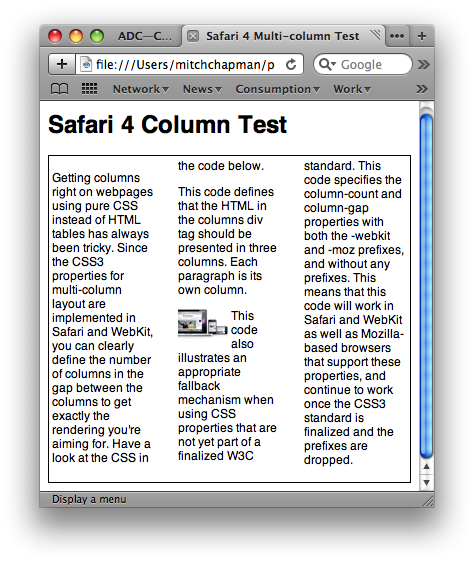
"Getting columns right on webpages using pure CSS instead of HTML tables has always been tricky. Since the CSS3 properties for multi-column layout are implemented in Safari and WebKit, you can clearly define the number of columns [and] the gap between the columns...

This code defines that the HTML in the columns div tag should be presented in three columns. Each paragraph is its own column."


Wow, that's nice! It means you can define a fluid multi-column layout and have content flow between those columns.
safari_4_columns_1.png

Granted, the layout can do some strange things when images bleed across columns.
safari_4_columns_2.png

Maybe one of the -webkit-column-break-* properties can control this.

[Update: Of course Firefox 3 supports most of these column properties as well, via -moz-column-*. Firefox 3.1 beta 2 extends support to properties such as -moz-column-rule.]

2009/02/17

macosxhints.com - 10.4: Use Automator to batch add Spotlight comments

Edited lightly:

macosxhints.com - 10.4: Use Automator to batch add Spotlight comments:

10.4: Use Automator to batch add Spotlight comments

By: cafemomo on Wed, May 18 2005 at 6:24AM PDT

In Automator, create the following workflow:

1. Finder > Get Selected Finder Items

2. Spotlight > Add Spotlight Comments to Finder Items

2.1. Keep 'Append to Existing Comments' checked

2.2. Open the Options disclosure area and check 'Show Action When Run' so you can set comments each time

3. In Automator, go to File > Save as Plug-in..., enter 'Add Spotlight Comments' as the 'Save Plug-in As:' name, and make sure 'Plug-in for:' is set to 'Finder'

4. Save and close Automator (if it asks you to save again, do so)

Now in Finder, select some items you want to add comments to and right-click (or control-click) and select 'Add Spotlight Comments' from the 'Automator' submenu.


Handy, e.g. for tagging related travel video clips which have been imported with Final Cut Pro.

2009/02/13

VoodooPad and TextMate

VoodooPad's new HTML-savvy application-specific URLs are a great way to retrace your steps in TextMate.

I keep my worklog in VoodooPad. I do most of my code editing in TextMate. When I'm trying to understand a new chunk of code, I often need to jump around through the code base.

It's hard to keep track of where I've been, so I can back out of a code path once I understand what it does. Until now I've just jotted down pathnames and line numbers in my worklog, so I could manually retrace my steps.

Puzzle Pieces


  • VoodooPad URLs. They let you inject HTML content — including hyperlinks — into an open VoodooPad document.
  • TextMate URLs of the form txmt://open?url=file://pathname&line=lineNum;column=colNum. Open one of these URLs and TextMate will open a window showing the specified line (and column, if specified) of the specified file.
  • Textmate commands and key equivalents.
    TextMate lets you define custom commands and trigger them with keyboard shortcuts that you specify.


Put these all together and what do you get?

Scenario
  • Select some code of interest in TextMate
  • Type your keyboard shortcut
  • A hyperlink pointing to the selected code is inserted into your VoodooPad document

Later, when you want to get back to that chunk of code, just click on the hyperlink in VoodooPad. TextMate will open the document and jump to the line of code referenced by the hyperlink.

Granted, you're probably going to edit that code someday; and then your bookmarks will break. But this is a handy way to leave a trail of breadcrumbs while you're trying to decipher a new body of code.

Code

Here's a Python script which implements this "Bookmark in VoodooPad" capability in TextMate. You can use it by opening TextMate's Bundle Editor (Bundles -> Bundle Editor -> Show Bundle Editor), creating a New Command using the tool menu at the bottom left of the Bundle Editor window, and pasting it into the resulting Command(s) text area:

#!/usr/bin/env python2.6
import os, datetime, urllib, subprocess

escape = urllib.quote

# What Textmate location are we bookmarking?
path = os.environ["TM_FILEPATH"]
lineNum = os.environ["TM_LINE_NUMBER"]
_tmURLTemplate = """txmt://open?url=file://{path}&line={lineNum}"""
tmURL = _tmURLTemplate.format(path=path, lineNum=lineNum)

# Which VoodooPad worklog page should we add it to?
vpPageName = escape(datetime.date.today().strftime("%Y-%m-%d"))

# What text should Voodoopad show for the link?
currLine = os.environ.get("TM_SELECTED_TEXT", os.environ["TM_CURRENT_LINE"])

# How should the HTML be formatted?
_vpHTMLTemplate = '''<a style="font:12px helvetica" href="{tmURL}">{currLine}</a>'''
vpMarkup = _vpHTMLTemplate.format(tmURL=tmURL, currLine=currLine)

# What URL do we open to inject the HTML into VoodooPad?
_vpURLTemplate = """voodoopad:html={vpMarkup}&page={vpPageName}"""
vpURL = _vpURLTemplate.format(vpMarkup=escape(vpMarkup), vpPageName=escape(vpPageName))

subprocess.check_call(["open", vpURL])


Specify a key equivalent such as ⌘-T (Command-T) and you're off to the races.

VoodooPad bookmarklets now support HTML

VoodooPad bookmarklets are very useful. But they let you paste only plaintext from your web browser into your document — until now.

VoodooPad Application URLs

VoodooPad understands application-specific URLs of the form voodoopad:description=encoded_text&page=name_of_VoodooPad_document_page. When you open one of these URLs, VoodooPad inserts the encoded text into the indicated page of the current VP document.

You can open voodoopad: URLs from other applications, such as a web browser. That's what's so cool about VP bookmarklets -- they let you quickly select some text in your web browser and paste it into a VP document, along with other information such as the URL where the text originated.

The only problem is, the description parameter can contain only plain text. So if you've selected part of a web page that contains hyperlinks, those hyperlinks won't come along for the ride.

New Feature

Gus Mueller, VoodooPad's creator, recently released a new build. It adds a new html parameter to VoodooPad URLs. Now you can select part of a web page and transfer it as HTML into your VoodooPad document.

Gus summarized the new feature thus:

The format of the bookmarklet is like so:
voodoopad:page=junk&html=<b>hello</b>%20world!
Here's expanded code for a JavaScript bookmarklet which takes advantage of the new parameter. It works in both Safari and Firefox 3.0.x:

javascript: function pad(v) {
var res=String(v);while(res.length<2) {
res='0'+res;
}
return res;
};
var d=new Date();
var page=(String(d.getFullYear())+'-'+
pad(d.getMonth()+1)+'-'+ pad(d.getDate()));
function selHTML() {
var wr=document.createElement('div');
var c=window.getSelection().getRangeAt(0).cloneContents();
wr.appendChild(c);
return wr.innerHTML;
};
location.href='voodoopad:html='+encodeURIComponent('<div style="font:12px helvetica">'+location.href+'<br/>"""<br/>'+selHTML()+'<br/>"""</div><br/>')+'&page='+page;


Worth noting: in this snippet the html content is wrapped up in a div which has an explicit font specification. The bookmarklet is transferring a chunk of HTML, but that chunk doesn't include any of the CSS from the original web page. So if you don't specify a style for the wrapper div, VoodooPad will use its own default style for the current VP page. (I think that's something like Times Roman 10px.)

2009/01/07

iWork '09: Numbers

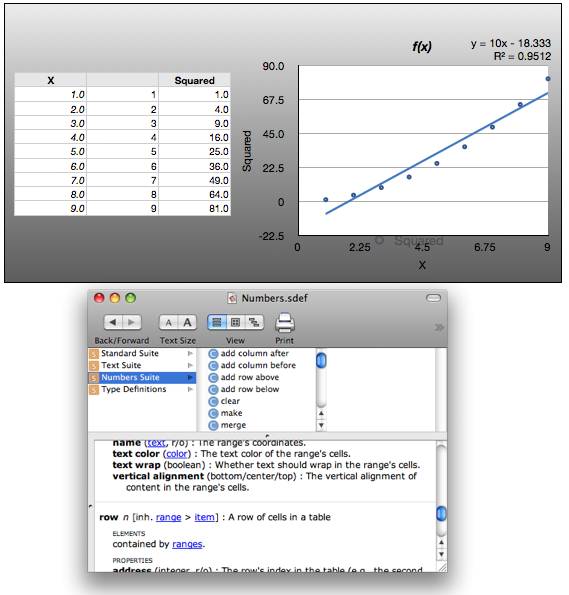
Numbers '09 has some significant improvements.

  • It supports axis transformations — linear, log-scale (okay, that's probably not new).
  • It supports overlays, including a host of curve-fits, with annotations (formula, R-squared error, etc.)
  • Unlike its predecessor, Numbers '09 provides an AppleScript dictionary.


Impressive!

Picture 1.png

2008/11/06

TextMate CamelCase

Because I keep forgetting: In TextMate, you can toggle the selected text from lowercase_with_underscores to camelCase by typing Control-Shift-Minus (^_).

2008/07/29

Google Calendar supports CalDAV

Google Calendar has added support for CalDAV. For Mac weenies, this means you can share calendars across multiple Macs, adding and removing events via iCal. And you can do it without paying for MobileMe.

Wonderful stuff!

2008/07/24

Terminal.app hangs at startup

I just got bit by this bug, under OS X 10.5.4. The symptoms are that sudo hangs, and Terminal.app hangs when opening a new tab or when starting up. Console.app shows messages of the form

7/24/08 7:04:44 AM kernel devfs: ttys001: name slot allocation failed (Errno=17)


rprr posted a workaround in the above thread which worked for me. I don't know how to link to specific messages in the discussion thread (or whether that's even allowed under the terms of use, egad), so here's a recap:
1. Started Terminal. It hung up. Did Force Quit and Sent Crash report to Apple.

2. Since I had a working X11 application, I used it to open about 10 xterms using the Applications->Terminal Menu of X11.app

3. I started Terminal again. Now it works.

2008/03/21

TUAW Terminal Tip: Safari 3.1 brings true one-window mode

Terminal Tip: Safari 3.1 brings true one-window mode:

...true one-window mode is finally, finally, here for Safari. All you need to enter is the command below into Terminal, hit enter, and you're sorted.

defaults write com.apple.Safari TargetedClicksCreateTabs -bool true


Yay!