2007/08/29

www.neweurasia.net - Blogging Central Asia » Kiran over Mongolia: Interview with Joseph Spaid

www.neweurasia.net - Blogging Central Asia » Kiran over Mongolia: Interview with Joseph Spaid:

Q: What motivated you to shoot the documentary?

I was moved by the rugged and natural beauty of the eagle hunters and their lifestyle. Berkutchis [...] are just so damn strong and tough. They typically don’t even wear gloves, although it regularly gets below -25ْ F where they hunt. They are true ‘badasses’ by my definition.

2007/08/28

A'bit an hour of Stephen Fry

Stephen Fry just turned 50. BBC did a documentary on him:
http://www.snitchseeker.com/harry-potter-news/j-k-rowling-potter-stars-talk-stephen-fry-49899/

It seems as if everybody is involved with the man, including many of the folks behind Harry Potter.

Would I could write. A pun of Fry and (six degrees of) Bacon is trying hard to form in my head.


2007/08/23

Ted Leung summarizes Erlang

Some simple thoughts...:

Semantically, there is a lot to like about Erlang - the actor based concurrency model, hot code swapping, higher order functions, and (once one gets used to it) pattern matching. The OTP libraries have been refined by many years of production usage in demanding, commercial applications.

2007/08/20

Posting Syntax-Highlighted Code to the Web, Redux

Following up on July's post, I've modified my TextMate 'rawhtml' command so it no longer generates inline <style> sections. (They may work, but AFAIK <style> should appear only in a document's <head>.)

Instead, the command now wraps its output in a div of class SourceCode, and it expects the containing web page to include an appropriate <style> section.

Here's a test to see if this works :) I've added the following CSS to the Bottled Text template HTML:

div.SourceCode {
font-family: "Bitstream Vera Sans Mono", "Monaco", monospace;
font-size: 12px;
width: 500px;
overflow: auto;
margin: auto;
white-space: nowrap;
padding: 4px;
background-color: #ffffff;
border: 1px solid #777788;
}

div.SourceCode .comment {
font-style: italic;
color: #888;
}

div.SourceCode .keyword {
font-weight: bold;
}

div.SourceCode .string {
color: #00F;
}

div.SourceCode .entity {
text-decoration: underline;
}

div.SourceCode .storage {
color: #888;
}

div.SourceCode .support {
color: #0b0;
}

div.SourceCode .constant, div.SourceCode .variable {
color: #F0F;
}


The "rawhtml" command script now looks like this:
#!/bin/sh
cat <<HTML
<div class="SourceCode">
<div style="white-space: pre; -khtml-line-break: after-white-space;">
HTML


perl -pe 's/<\/[^>]+>/<\/span>/g' \
| perl -pe 's/<([^\/.>]+)[^>]*>/<span class="$1">/g' \
| perl -pe 's/\t/&nbsp;&nbsp;&nbsp;/g'

echo "</div></div>"


To get a realistic preview in MarsEdit, click the "Edit Template" button in the preview window and add a <style> section to the preview template for your blog. Paste in the CSS above and you're good to go.

2007/08/14

Sci Foo 2007 Gossip Liveblog (Aaron Swartz's Raw Thought)

Engrossing summary: Sci Foo 2007 Gossip Liveblog (Aaron Swartz's Raw Thought).

Dyson: Climate models are rubbish | The Register

Dyson: Climate models are rubbish | The Register:

"Dyson can expect another round of crucifixion with the predictable chorus that he's not a climate 'scientist'.
His contention, that the models aren't really science when they're programmed to produce the expected results, will no doubt be overlooked. ®"


I love the way Dyson writes. His article is full of thought-provoking observations and assertions, not all of them as directly concerned with global warming as you might expect. For example:
All our fashionable worries and all our prevailing dogmas will probably be obsolete in fifty years.

2007/08/06

Death, taxes and beyond

I thought bureaucracy could follow you only as far as the grave. But then there's eastern religion:
China tells living Buddhas to obtain permission before they reincarnate - Times Online

Via Ottmar Liebert

2007/07/19

Posting Syntax-Highlighted Code to the Web

Awhile back I noted some ways to copy syntax-highlighted text from TextMate to other applications like VoodooPad and MarsEdit. In some cases it was a simple procedure of two or three steps. But getting syntax-highlighted text into MarsEdit was comparatively tedious.

In all cases the procedure started with the Experimental -> View Document as HTML bundle. This morning I finally got around to browsing that bundle's definition and lo! it's just a simple Perl script invocation.

Better yet, it can act on either a complete document or just the text you've selected within that document. So if you want to post a code snippet? No problem.

It's also easy to make a copy of the bundle which, instead of creating a new HTML document, creates a plaintext document containing the HTML mark-up. You can copy the contents of this document and paste it directly into MarsEdit. (With a few caveats, i.e. you need to modify the stylesheet to avoid affecting the appearance of your entire post.)

The steps are simple:


  1. Select Bundles->Bundle Editor->Show Bundle Editor...

    Picture 4.png

  2. Browse into Experimental and select the View Document as HTML command
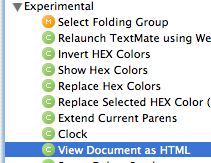
    Picture 5.png

  3. Click the "double-plus" button at the bottom of the window to make a copy of the command
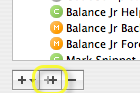
    Picture 6.png

  4. Drag the command to some other bundle. I like to keep custom snippets, commands and templates in an @My Stuff bundle, which won't get overwritten when I upgrade TextMate

  5. Select the copied command. Rename it as you see fit, e.g. Format as Raw HTML

  6. Change the Output popup menu's value from Show as HTML to Create New Document
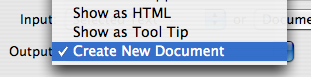
    Picture 8.png


That's it! Now you can select some code which you want to post, select your new command from the Bundles menu, and get a window with (almost) ready-to-post HTML markup.

Next Steps


Keyboard Navigation


If you come from (X)Emacs and wish you could invoke the bundle without having to navigate through a menu hierarchy, you can. Just use Control-Command-T to bring up the Select Bundle Item command window. Then type in the name of your new command, and hit return.

Picture 11.png

If you want to feel even more at home you can give your bundle a name which "feels like" an Emacs command. I've been trying single-word "command name" prefixes, like "rawhtml - Format as Raw HTML". The idea is to give your command both a quick-to-type "command" name, so you can get to it quickly in the command window, and a human-readable name so you can remember what it does :)

Limiting the Scope of the Styling


I haven't had time to do further customizations to the command. The next thing to tackle will be the stylesheet which it generates -- it's written to address an entire document, so it applies styles to e.g. the body element. I'd like to customize the generated HTML so it puts everything into a <div> with a unique timestamp for its id, and to modify the CSS so it applies only to that div. That'll make it easier to create markup that can be dumped directly into a blog regardless of what else might be on the blog page.


Update:
Turns out it was easy to modify the generated styesheet, and to wrap the output in a timestamped div. I'm not sure how righteous it is to include a <style> block inside the body of a blog post, rather than the head, but it renders okay in WebKit and Firefox 2.


Here's the source code for the command, as rendered by itself :)


#!/bin/sh
now=`date +'%Y%m%d%H%M%S'`

cat <<HTML
<style type="text/css">
#source_${now} {
font-family: "Bitstream Vera Sans Mono", "Monaco", monospace;
font-size: 12px;
width: 400px;
overflow: auto;
margins: auto;
padding: 4px;
background-color: #ffffff;
border: 1px solid #777788;
}

#source_${now} .comment {
font-style: italic;
color: #888;
}

#source_${now} .keyword {
font-weight: bold;
}

#source_${now} .string {
color: #00F;
}

#source_${now} .entity {
text-decoration: underline;
}

#source_${now} .storage {
color: #888;
}

#source_${now} .support {
color: #0b0;
}

#source_${now} .constant, #source_${now} .variable {
color: #F0F;
}

</style>
<div id="source_${now}">
<div style="white-space: pre; -khtml-line-break: after-white-space;">
HTML


perl -pe 's/<\/[^>]+>/<\/span>/g' \
| perl -pe 's/<([^\/.>]+)[^>]*>/<span class="$1">/g' \
| perl -pe 's/\t/&nbsp;&nbsp;&nbsp;/g'

echo "</div></div>"

2007/07/18

Firefox 2.x / Linux image scaling

Why does image scaling seem to be so bad in Firefox 2 on Linux?

For one of our web apps we want to show static pixmap images of chemical depictions. Depending on the context we want to show those depictions at different sizes, and we don't want to create and cache too many renderings. We'd rather create one fairly large rendering and have the browser scale it down as needed.

For users who are running Firefox/Win or Firefox/Mac this works fairly well, if the images aren't scaled down too much. (Otherwise lines get too thin, as you'd expect.) But for Firefox/Linux users, the results look horrible.

ff_mac.pngff_linux.png
Firefox/MacFirefox/Linux

What's up with that? Is there any way to control how Firefox downscales images, to get better quality?

Perhaps not. Or not yet, at least. Acts of Volition has an entry comparing image resizing in Firefox 2.x and Firefox 3. Paraphrasing:
The Cairo graphics library will power Firefox 3.
In Firefox 2, if you tell the browser to resize an image it will do so, but not with any of the smoothness that you would see if you had resized the image in an application like Photoshop or the Gimp.

Now, in Firefox 3.0 Alpha 1, resizing an image like this actually produces a smoothly sized image.

2007/07/14

changelog: Parallels 3.0: breaking the network

changelog: Parallels 3.0: breaking the network:

Parallels Desktop for Mac installs a startup item, llipd, which delays network traffic of some forms as much as 5 seconds.


According to /Library/StartupItems/ParallelsTransporter/StartupParameters.plist llipd is a "Parallels Link-local IPv4 deamon" (sic).

I don't need Parallels Transporter, so it's outta there.

2007/07/12

JavaScriptTemplates

JavaScriptTemplates offers template-driven formatting of web-page content, using JavaScript.

It will be fun to try this out. I often need to build web pages in which some of the content is created dynamically, via Ajax requests. The JavaScript which transforms the incoming JSON data to HTML tables can be painful to maintain. But I can't use server-side templating because I don't want to reload the entire page.

JavaScriptTemplates seem to offer a way around this. Not sure how one goes about previewing the templates, which are embedded in hidden textareas. Much to learn...

It will be really interesting to see how this, together with Naneau or Jester, changes development of dynamic web apps.

After the First Blush

Hm, this is a little troublesome:

    var myStr = "Hello ${customer.first} ${customer.last}, Welcome back!";
// Using the process() method is easy...
result = myStr.process(data);

Do they really pollute JavaScript Strings with a process method?

Yes, they do...
String.prototype.process ( contextObject, optionalFlags )

As a convenience, the String prototype is enhanced with a process() method. It parses the String as a template and invokes process(). The arguments are the same as for templateObject.process().

2007/07/09

socket.getfqdn() ignores changes to /etc/hosts

I thought that was the problem, anyway. I'd edited /etc/hosts, changing the fake fully-qualified domain name of my host. Yet, when I launched Python and tried to get the domain name, it still returned the value which had originally been in /etc/hosts:

>>> import socket
>>> socket.getfqdn()


Short answer: after making a change to /etc/hosts, don't forget to flush the lookup daemon's cache:
sudo lookupd -flushcache

Safari Bookmark management

This Mac OS X Hint is helping me learn more about bookmark management in Safari.[1] For example, here's a JS bookmarklet that searches for the selected text in Google, displaying the result in a new window:

javascript:x=escape(window.getSelection().getRangeAt(0));window.open("http://www.google.com/search?q="+x, "_googTab");

I'm not sure about the easiest way to create a new bookmarklet in Safari's Bookmarks bar. So for now I just use the + button to add whatever web page I'm currently viewing; then click the Bookmarks icon, select the new bookmark, change its name, and replace its address w. the JavaScript for the bookmarklet.

Assigning Shortcuts

How do you assign shortcuts to bookmarks? Another hint shows how to do so without having to use the System Preferences => Keyboard and Mouse => Keyboard Shortcuts panel.
defaults write com.apple.Safari NSUserKeyEquivalents '{"Google in New Tab"="@$G";}'

Opening in New Tabs?

Hm... So by using JavaScript bookmarklets, could I implement the 'Search in Google in New Tab' feature for which I've been pining?

Alas, it may be possible, but I don't know how to do it. Once I've put the bookmarklet in my bookmars bar, it doesn't matter whether I left-click or right-click and select "Open in New Tab"; I always get a new window. And if I change the JavaScript to set the current location rather than open a new window, then it always overwrites the current page.

It's too bad that (AFAIK) JavaScript does not yet recognize that many browsers support tabs.


[1]I've missed years of hints and from all over the web that show how to create search bookmarklets, for a host of search engines.) And of course Firefox has a much cooler keymarks facility, which Bob DuCharme explained way back in 2004.

2007/07/07

Replicating iPhone Buttons the 'webkit' way! at LaunchPad Blog

Replicating iPhone Buttons the '-webkit' way! at LaunchPad Blog

This is pretty cool. I've had recent projects where distinct images had to be created for button links, even though they differed only in the button text. Here's hoping CSS 3's border-image catches on with all of the major browsers, soon.

2007/07/04

Wah, crawling is hard

Wired Science - Wired Blogs:

"The researchers say that fake crying, used to get attention though nothing is wrong, is a first step on the slippery slope to deception. The dishonesty, said lead investigator Vasudevi Reddy, can be detected when babies pause to see if they've been heard -- showing that they're 'clearly able to distinguish that what they are doing will have an effect.'"

Aiga taught us about this during our first week in Karaganda. As she crawled laboriously across the floor she made the most pitiful little cries. Yet, when we told one of the other adoptive parents that Aiga was the one, her response was, "Oh, you mean the busy little one who crawls so fast?"

2007/07/02

Saving the Saiga antelope

News from the Caravan: Wild Kazakhstan:
The Rise and Fall of the Saiga
:

One of the main species to be protected is the saiga, an ungulate (hooved mammal) that’s somewhere between a sheep and an antelope. It looks like a critter Dr. Seuss would think up, and the story of the saiga is like that of the truffula tree. From millions to rare, back to millions, and now endangered again, in little more than a century.
"Dr. Seuss" indeed! But it still reminds me of Zoidberg.

2007/06/28

Westinghouse Service - at last

Can it be that our Westinghouse service saga is finally at an end?

Yesterday Westinghouse finally sent us a replacement for our defective LVM37w3.

The new unit is probably a refurb. The serial number is definitely different from that of the one we sent in for repair, and it displays a different message when a new video source is detected.

For the record, it took 55 days for Westinghouse to repair/replace our broken monitor. With that kind of turn-around time, I'd have to advise any prospective buyer to go with a different brand.

2007/06/26

Subversion, Bazaar and Mac document bundles

Subversion has problems dealing with Mac applications which store their documents as bundles (directory trees). The first is that such bundles may contain an icon preview file, "Icon\r", whose filename contains a carriage return. The second is that the bundle may contain files representing e.g. pasted graphics, which come and go as the document is edited. Subversion cannot, as far as I know, add and remove such nested files without user intervention.

Some applications, like OmniGraffle, offer a workaround for the hierarchical document structure. Other applications do not, e.g. LineForm, and VoodooPad, and Apple's own KeyNote and TextEdit.

(That's not quite true. The VoodooPad Lua Plugin Snippets page shows a Lua plugin which handles the hierarchical document problem by automatically adding new documents, removing deleted documents, and committing changes, for a designated directory.)

Does bzr handle either of these problems more gracefully than subversion?

Testing shows that bzr handles "Icon\r" with aplomb. However, it does not automatically add any new nested files to the repository. It's up to you to add them manually, just as in subversion.

2007/06/20

Bug with jQuery 1.1.2, Interface 1.2, Slider with fractions

I have a Slider with fractions and an onSlide handler. Sometimes when the handler is invoked, the reported value for xProc seems to be "lagging" -- it seems to be the value from just before the slider jumped to its current position.

Here's a fragment demonstrating the problem:


<div id="slider_frame">
<div id="bar">
<div id="indicator" class="Indicator"></div>
</div>
</div>
<p id="msg"></p>
...
onSlide: function(xProc, yProc, x, y) {
var fraction = x / this.dragCfg.containerMaxx;
var nearest = Math.round(x / 4) * 4;
var expected = Math.round(nearest * 100 / this.dragCfg.containerMaxx);
$("#msg").html("Expected " + expected + ", got " + xProc);


In the web app where I've encountered this problem, I'm working around it by recomputing the xProc value inside the onSlide handler:
    xProc = parseInt(x * 100 / this.dragCfg.containerMaxx);


Here's a more complete example:
<!DOCTYPE html PUBLIC "-//W3C//DTD XHTML 1.0 Strict//EN"
"http://www.w3.org/TR/xhtml1/DTD/xhtml1-strict.dtd">
<html lang="en">
<head>
<meta http-equiv="Content-type" content="text/html; charset=utf-8">
<title>interactive_problem_demo</title>
<style type="text/css" media="screen">
#slider_frame {
border: 1px inset;
position: relative;
width: 300px;
height: 12px;
}
#bar {
position: absolute;
width: 300px;
height: 12px;
background-color: #99a;
}
#indicator {
position: absolute;
width: 6px;
height: 12px;
background-color: #eef;
}
#msg {
max-width: 300px;
}
.Good {
background-color: #0f0;
}
.Bad {
background-color: #f99;
}
</style>
</head>
<body>
<div id="slider_frame">
<div id="bar">
<div id="indicator" class="Indicator"></div>
</div>
</div>
<p id="msg" class="Good">Please click in the trough.</p>

<script src="../../../shared/js/jquery/jquery.js" type="text/javascript" charset="utf-8"></script>
<script src="../../../shared/js/jquery/interface.js" type="text/javascript" charset="utf-8"></script>
<script src="../../../shared/js/jquery/dimensions.js" type="text/javascript" charset="utf-8"></script>

<script type="text/javascript" charset="utf-8">
<!--
$(document).ready(function() {
var f = 5;
var slider = $("#bar").Slider({
accept: "#indicator",
fractions: f,
onSlide: function(xProc, yProc, x, y) {
var fraction = x / this.dragCfg.containerMaxx;
var expected = Math.round(100 * fraction / (f - 1)) * (f - 1);
$("#msg").html("Expected " + expected + ", got " + xProc);
$("#msg").removeClass("Good Bad");
$("#msg").addClass(xProc == expected ? "Good" : "Bad");
}
})
});
//-->
</script>
</body>
</html>

2007/06/19

Mail.app, pasted graphics, and Windows recipients

[Draft]

Summary

When composing in Mail.app:

  • if you attach a file, its format is preserved
  • If you paste a screen capture, some capture formats will be translated to TIFF
  • Some Windows users cannot view TIFF mail attachments
  • This behavior seems to apply to other OS X applications as well
Here's a table showing how Mail.app translates pasted graphics, under Mac OS X 10.4.9:
Screen CapturePasted Format
GIFTIFF
JPGTIFF
PDFPDF
PNGPNG
TIFFTIFF

Gory Details

If I paste screenshots into my Mail.app messages, some Windows recipients cannot see those screenshots. When sending to these recipients I have to use a much more tedious process:
  1. Save screenshot to file
  2. Compose mail
  3. Click "Attach"
  4. Browse to saved file
Others are dealing with the same problem. Witness this thread at macosxhints.com.

Is the problem that the pasted graphics are set to display inline? (Content-Disposition: inline) No. No matter how I make an attachment, whether through pasting or through the Attach button, Mail.app always sets Content-Disposition to inline. And Windows users can see some attachments.

Is there anything relevant in ~/Library/Preferences/com.apple.mail.plist? Not as far as I can tell.

I have changed my default screen capture format, following the instructions in this macosxhints article:
    defaults write com.apple.screencapture type format
killall SystemUIServer

My format is set to jpeg. That seems to be the problem. Mail.app translates pasted JPEG images to TIFF. Attached JPEG images retain their format.

I'm not sure about the reasons for this, but Preview.app seems to confirm the following weirdness: If you do a screen capture to the clipboard, some formats such as JPG get converted to PICT. If you do the screen capture to a file, then the format you specify is the format used in the capture file.